PB Table
PB Table
PB tables are data tables defined and accessed according to the PB (Protobuf) protocol.
In addition to PB tables, TcaplusDB also provides TDR tables.
There is no essential difference between PB tables and TDR tables. Users can decide whether to use PB tables or TDR tables according to their familiarity with PB tables or TDR tables. It should be noted that the functions supported by PB and TDR tables in the current TcaplusDB are somewhat different(For details, see the section “What is TcaplusDB - 2.3. Table” introduction). When selecting which table to use, users also need to consider whether the function can meet app requirements.
1. About Protobuf
Protobuf is a descriptive language developed by Google that serializes structured data while emphasizing simplicity and performance.
Official documents: https://developers.google.com/protocol-buffers
2. Examples of the PB Table Definition File
Here is an example of a protobuf table, game_players.proto, and you can upload a file to the console and create a table.
syntax = "proto3";         // Specify the protobuf language version, proto3.

// Import the TcaplusDB public definition service
import "tcaplusservice.optionv1.proto";

message game_players {  // Define a TcaplusDB table, including the message type

// Create a primary key field based on the option tcaplusservice.tcaplus_primary_key
// A single table of TcaplusDB can specify up to 8 primary key fields (3.37.0 and later)
    option(tcaplusservice.tcaplus_primary_key) = "player_id, player_name, player_email";
    option(tcaplusservice.tcaplus_sharding_key) = "player_id";

    // Create a primary key index based on the option tcaplusservice.tcaplus_index
    option(tcaplusservice.tcaplus_index) = "index_1(player_id, player_name)";
    option(tcaplusservice.tcaplus_index) = "index_2(player_id, player_email)";

    // Numeric types supported by TcaplusDB:
    // int32, int64, uint32, uint64, sint32, sint64, bool, fixed64, sfixed64, double, fixed32, sfixed32, float, string, bytes
    // Nested type: message

    // Primary key field
    int64 player_id = 1;
    string player_name = 2;
    string player_email = 3;

    // Common (non-primary) key field
    int32 game_server_id = 4;
    repeated string login_timestamp = 5;
    repeated string logout_timestamp = 6;
    bool is_online = 7;

    payment pay = 8;
}

message payment {

int64 pay_id = 1;
uint64 amount = 2;
int64 method = 3;

}
3. Descriptions of the PB Table Definition File
3.1. TcaplusDB Related Attributes
The TcaplusDB table definition can be extended with options based on protobuf syntax to achieve richer semantic functions. The contents that can be defined are shown in the following table.
Note: Currently, Tcaplus does not restrict the size of fields in a PB table’s schema.
The detailed definition format is: `option(tcaplusservice.option) = “value”;`
| Option Name | Function Description | Example | Required |
|---|---|---|---|
| tcaplus_primary_key | Set the TcaplusDB table primary key field | option(tcaplusservice.tcaplus_primary_key) = "uin,name,region"; | Yes |
| tcaplus_index | Set the TcaplusDB table index key field | option(tcaplusservice.tcaplus_index) = "index_1(uin,region)"; | No |
| tcaplus_sharding_key | Users can customize the table shard key. By default, there is no need to set. It is only required when a valid index (tcaplus_index) is defined. | option(tcaplusservice.tcaplus_sharding_key) = "uin"; | No |
| tcaplus_field_cipher_suite | If the field encryption function is used, please refer to the examples for settings. If users specify their own encryption algorithm, please refer to the API examples. | option(tcaplusservice.tcaplus_field_cipher_suite) = "DefaultAesCipherSuite"; | No |
| tcaplus_cipher_md5 | If the field encryption function is used, It needs to set MD5 on the user side to save the encryption password string. | option(tcaplusservice.tcaplus_cipher_md5)= "62fee3b53619b7f303c939964c6f2c4b"; | No |
3.1.1 tcaplus_primary_key (primary key)
The tcaplus_primary_key attribute indicates the primary key of the database table corresponding to this element. If the primary key contains multiple members, the member names are separated by commas (’,’). A single table can specify up to eight primary key fields.
Constraints:
-
Members as primary keys cannot be compound data types but can only be basic built-in data types.
-
Members’ values as primary keys cannot be NULL.
-
TcaplusDB will serialize all primary key fields into a single buffer, with a maximum length limit of 1022 bytes.
option(tcaplusservice.tcaplus_primary_key) = "player_id, player_name, player_email";
According to the above description, the game_players table uses three members player_id, player_name, and player_email as primary keys.
3.1.2. tcaplus_sharding_key (splittable attribute/splittable factor)
How to select splittable factors
The tcaplus_ sharding_key attribute allows users to customize the table shard keys.
Constraints:
This member cannot be a compound data type, but only a basic built-in data type.
option(tcaplusservice.tcaplus_sharding_key) = "player_id";
3.1.3. tcaplus_index (local index)
The tcaplus_index attribute is used to set the index key field of the TcaplusDB table.
option(tcaplusservice.tcaplus_index) = "player_email";
3.2. File Definition Information
The file definition information area mainly defines the public information of the current table description file, mainly involving the following three types of content:
| Option Name | Function Description | Value Example | Required |
|---|---|---|---|
| syntax | Indicate a grammar specification version written by the current file. | Support proto2 and proto3 | Yes |
| package | Indicate a custom package name for the current file to avoid name collisions between the message type. | Package name information | Yes |
| import | Introduce some common information about the TcaplusDB table that must be referenced in your table definition. | tcaplusservice.optionv1.proto | Yes |
3.3. Table Definition Information
The table definition information defines the format of the table through message, where it defines the extension information of the table and can also define the field information of the table.
3.4. Field Definition Information
The format of the TcaplusDB definition field is: `Field modifiers Field types Field name = ID number [Special definitions];`
3.4.1. Field modifiers
The proto2 supports three types of modifiers. The proto3 no longer supports the required modifier and defaults to the optional type.
-
required: indicates that the field is required, and the primary key field in proto2 must be modified by required.
-
optional: indicates that the field is optional and supports setting the default value of the field.
-
repeated: indicates that the field can contain 0 to N elements. Its attributes are the same as optional, but can contain multiple values at a time. It can be seen as passing the value of an array. And a special definition for [packed = true] must be specified.
3.4.2. Field types
TcaplusDB supports regular fields and nested fields. For detailed field descriptions, see the following table.
Mapping of proto3 data types to programming language types
| .proto type | C++ type | Java type | Python type | Go type | Ruby type | C# type | PHP type | Dart type | Description |
|---|---|---|---|---|---|---|---|---|---|
| double | double | double | float | float64 | Float | double | float | double | |
| float | float | float | float | float32 | Float | float | float | double | |
| int32 | int32 | int | int | int32 | Fixnum or Bignum (as required) | int | integer | int | Use variable-length encoding. The negative coding is inefficient - if your field may have negative values, use sint32 instead. |
| int64 | int64 | long | int/long | int64 | Bignum | long | integer/string | Int64 | Use variable-length encoding. The negative coding is inefficient - if your field may have negative values, use sint64 instead. |
| uint32 | uint32 | int | int/long | uint32 | Fixnum or Bignum (as required) | uint | integer | int | Use variable-length encoding. |
| uint64 | uint64 | long | int/long | uint64 | Bignum | ulong | integer/string | Int64 | Use variable-length encoding. |
| sint32 | int32 | int | int | int32 | Fixnum or Bignum (as required) | int | integer | int | Use variable-length encoding. |
| sint64 | int64 | long | int/long | int64 | Bignum | long | integer/string | Int64 | Use variable-length encoding. Signed int values. They encode negative numbers more efficiently than regular int32. |
| fixed32 | uint32 | int | int/long | uint32 | Fixnum or Bignum (as required) | uint | integer | int | Four-byte values. If the value is usually greater than 2^28^, it is more effective than uint32. |
| fixed64 | uint64 | long | int/long | uint64 | Bignum | ulong | integer/string | Int64 | Eight-byte values. If the value is usually greater than 2^56^, it is more effective than uint64. |
| sfixed32 | int32 | int | int | int32 | Fixnum or Bignum (as required) | int | integer | int | Four-byte values. |
| sfixed64 | int64 | long | int/long | int64 | Bignum | long | integer/string | Int64 | Eight-byte values. |
| bool | bool | boolean | bool | bool | TrueClass/FalseClass | bool | boolean | bool | |
| string | string | String | str/unicode | string | String (UTF-8) | string | string | String | The string must always contain UTF-8 encoding or 7-bit ASCII text . |
| bytes | string | ByteString | str | []byte | String (ASCII-8BIT) | ByteString | string | Values can contain no more than 232 arbitrary byte sequences. |
Reference link: https://developers.google.com/protocol-buffers/docs/proto3
Mapping of proto2 data types to programming language types
| .proto type | C++ type | Java type | Python type | Go type | Description |
|---|---|---|---|---|---|
| double | double | double | float | *float64 | |
| float | float | float | float | *float32 | |
| int32 | int32 | int | int | *int32 | Use variable-length encoding. The negative coding is inefficient - if your field may have negative values, use sint32 instead. |
| int64 | int64 | long | int/long | *int64 | Use variable-length encoding. The negative coding is inefficient - if your field may have negative values, use sint64 instead. |
| uint32 | uint32 | int | int/long | *uint32 | Use variable-length encoding. |
| uint64 | uint64 | long | int/long | *uint64 | Use variable-length encoding. |
| sint32 | int32 | int | int | *int32 | Use variable-length encoding. Signed int values. They encode negative numbers more efficiently than regular int32. |
| sint64 | int64 | long | int/long | *int64 | Use variable-length encoding. Signed int values. They encode negative numbers more efficiently than regular int64. |
| fixed32 | uint32 | int | int/long | *uint32 | Four-byte values. If the value is usually greater than 228, it is more effective than uint32. |
| fixed64 | uint64 | long | int/long | *uint64 | Eight-byte values. If the value is usually greater than 256, it is more effective than uint64. |
| sfixed32 | int32 | int | int | *int32 | Four-byte values. |
| sfixed64 | int64 | long | int/long | *int64 | Eight-byte values. |
| bool | bool | boolean | bool | *bool | |
| string | string | String | unicode (Python 2) or str (Python 3) | *string | The string must always contain UTF-8 encoding or 7-bit ASCII text. |
| bytes | string | ByteString | bytes | []byte | Values can contain arbitrary byte sequences. |
Reference link: https://developers.google.com/protocol-buffers/docs/proto
3.4.3. Field name
Name the field with support for uppercase and lowercase letters, numbers, and underscores. It is recommended that fields be named in Camel-Case and not begin with a number.
3.4.4. ID numbers
ID ranges: [1,2\^ 29 - 1]. ID numbers [19000 - 19999] cannot be used because they are reserved in Protobuf protocol implementation. If used, errors will occur.
Each field will occupy memory when encoding, and the memory occupied depends on the ID number:
-
The field of the ID range [1,15] takes 1 byte during encoding.
-
The field of the ID range [16,2047] takes 2 byte during encoding.
3.4.5. Special definitions
-
The repeated modified field needs to specify the packaged = true option. The method is as follows:
repeated int64 lockid = 6 [packed = true]; -
The optional modified field default = 1 can be used to specify the default value. The method is as follows:
optional int32 logintime = 5 [default = 1]; -
Fields of string and bytes can be specified as encrypted fields. The method is as follows:
required string name = 2[(tcaplusservice.tcaplus_crypto) = true];
3.4.6. Nested type information
TcaplusDB supports nested types, which can either contain another nested type as its field or define a new nested type within the nested type.
The definition of a nested type, like the definition of a table, is declared by message. However, the structure cannot contain extended information definitions, such as “primary key”, “index”, etc.
TcaplusDB supports up to 32 levels of continuous nesting. It is not recommended to use nesting heavily because too many layers of nesting can lead to poor data access performance.
message game_players {
    option(tcaplusservice.tcaplus_primary_key) = "player_id, player_name, player_email";
    int64 player_id = 1;
    string player_name = 2;
    string player_email = 3;
    int32 game_server_id = 4;
    repeated string login_timestamp = 5;
    repeated string logout_timestamp = 6;
    bool is_online = 7;
    payment pay = 8;
}

message payment {
int64 pay_id = 1;
uint64 amount = 2;
int64 method = 3;
}
4. PB Table Modification Limitations
-
The primary key field cannot be deleted.
-
The primary key field name and field type cannot be modified.
-
The primary key field cannot be added.
-
For non primary key fields, the required field cannot be deleted, but the optional field can be deleted.
-
The field name and field type with the same ID cannot be modified.
-
The new regular field name must comply with the naming rules. Do not modify the type or name of an existing field.
-
Local indexes cannot be added, deleted, or modified. They must be defined at the time of creating a table.
4.1. Example 1: Adding a field
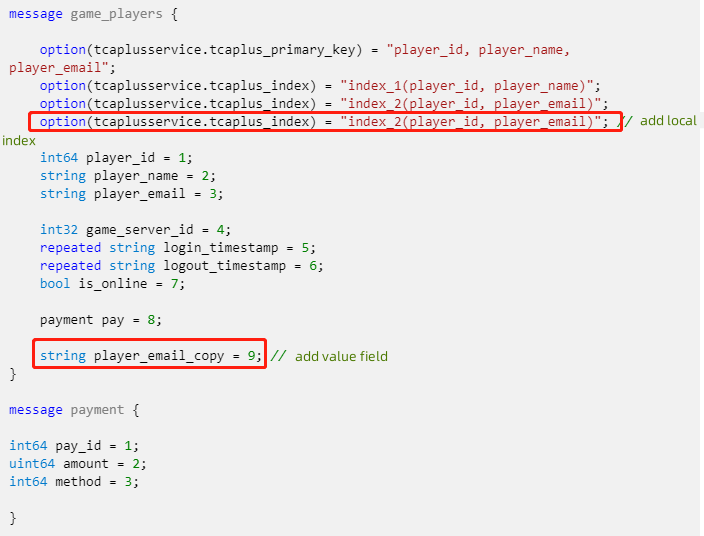
syntax = "proto3";

import "tcaplusservice.optionv1.proto";

message game_players {

    option(tcaplusservice.tcaplus_primary_key) = "player_id, player_name, player_email";
    option(tcaplusservice.tcaplus_index) = "index_1(player_id, player_name)";
    option(tcaplusservice.tcaplus_index) = "index_2(player_id, player_email)";

    int64 player_id = 1;
    string player_name = 2;
    string player_email = 3;

    int32 game_server_id = 4;
    repeated string login_timestamp = 5;
    repeated string logout_timestamp = 6;
    bool is_online = 7;

    payment pay = 8;

    string player_email_copy = 9; // Add a value field
}

message payment {

int64 pay_id = 1;
uint64 amount = 2;
int64 method = 3;

}