开始使用
TcaplusDB Client 开始使用
TcaplusDB Client是一个用于访问TcaplusDB数据的命令行工具,用于访问TcaplusDB中数据,当前TcaplusDB提供的命令有:
| 命令 | 说明 |
|---|---|
| help | 用于查询TcaplusDB Client支持的命令列表及使用方法。 |
| show | 用于查看当前连接的TcaplusDB中的所有数据表名,或者当前连接信息。 |
| desc | 用于查看指定数据表的元数据(表结构)。 |
| select | 用于查询数据表中的数据。 |
| count | 用于统计指定数据表中的记录总数。 |
| getttl | 用于查询数据的剩余生存时间(TTL)。 |
| insert | 用于向数据表中插入数据。 |
| update | 用于更新数据表中的数据。 |
| setttl | 用于设置数据的剩余生存时间(TTL)。 |
| replace | 用于替换数据表中的数据。 |
| delete | 用于删除数据表中的数据。 |
| dump | 用于导出数据表中的数据到本地文件。 |
| load | 用于将本地文件中的数据导入到数据表中。 |
| exit | 退出TcaplusDB Client。 |
| quit | 退出TcaplusDB Client。 |
1. 准备工作
参考创建集群文档,部署TcaplusDB集群,或者申请TcaplusDB服务。
参考创建业务文档,创建业务(App)。
参考创建游戏区文档,创建游戏区(Zone)。
参考创建表格文档,创建数据表。
注:以上准备工作如果某一项已经完成,可以直接跳过。
2. 环境要求
| 项目 | 要求 |
|---|---|
| 操作系统 | Linux |
3. 下载Client
参见Client下载文档。
4. 使用Client
4.1. 部署Client
根据前述指导,下载TcaplusDB Client后,将其上传至可与TcaplusDB网络联通的服务器中。
TcaplusDB Client为可执行文件,无需解压,可直接运行。
4.2. 启动Client并连接TcaplusDB
直接运行tcaplus_client,不带任何参数,会提示需要提供连接TcaplusDB所需的参数信息及样例(见下表和代码),用户在将样例中的相关参数替换为准备工作中收集到的相关信息后,即可启动TcaplusDB Client并连接TcaplusDB。
连接的TcaplusDB需要的相关参数及获取方法见下表:
| 参数 | 参数说明 | 获取方法 |
|---|---|---|
| -d | 目录服务器地址列表 | 获取目录服务地址列表 |
| -a | 业务ID | 获取业务ID |
| -s | 业务访问密码 | 获取业务访问密码 |
| -z | 游戏区ID | 获取游戏区ID |
# ./tcaplus_client
--------------------------------------------------------------------------------
invalid parameters, please start the client as following:
         ./tcaplus_client -a access_id -z tablegroup_id [-s signature] -d dir_server_url [-t table_name] [-l log_file.xml] [-T tdr_file.tdr] [-e execute_command].
         the params in [] are optional, and their order is not important.
         -a(--app_id)    APP_ID or Access ID of Cluster.
         -z(--zone_id)    ZONE ID or TableGroup Id.
         -s(--signature)    PASSWORD.
         -d(--dir)    dir server addr.
         -t(--table)    table to add.
         -l(--log)    log file name that must be client_log.xml, and log class name be client.
         -T(--tdr)    tdr filename.
         -e(--execute)    SQL command need to execute, the content should be in quotes.
         e.g. ./tcaplus_client -a 2 -z 3 -s "FE6533875C8385C3" -d 172.25.40.181:9999 -T table_test.tdr -e "select a, b from table where key = 1;".
         -f(--command_file)    the file that saves sql query commands.
         -n(--timeout)    set timeout seconds.
         -q(--qps)    set the upper limit of the number of requests sent per second, currently only valid for load operations.
运行tcaplus_client,并指定要连接的TcaplusDB的相关参数后,即可进入TcaplusDB Client命令行,执行其它命令访问TcaplusDB中的数据。
# ./tcaplus_client -a 2 -z 3 -s 51BD7E6215D6F0BE -d 9.135.8.93:9999

====== Welcome to use tcaplus_client, use "help" to show usage ======

tcaplus>
4.3. 访问TcaplusDB数据
用户可使用help命令,或者参考命令说明文档,了解更多的命令及用法。
tcaplus> help;
--------------------------------------------------------------------------------
      help: show usage of commands, example: "help select;".
      show: get server status related information. executing "help show;" for details.
      exit/quit: exit the client.
     count: print record number in the database.

      desc: print table field name and type.
    select: query records from database.
    insert: insert a new record into database.
   replace: replace a record into the database.
    update: update a record in the database.
    delete: delete record(s) from database.

      dump: dump records from database.
      load: load records into the database.

--------------------------------------------------------------------------------
用户也可通过 > help 具体命令 可以查看指令命令的具体使用方法。
命令执行过程中的常见错误信息和产生原因详见常见错误文档。
4.4. 设置Client日志输出
默认情况下,TcaplusDB Client会将日志输出到当前目录的client.log和client_NetThread*.log文件中,并且只输出INFO级别(INFO/WARN/ERROR/FATAL)以上的日志。
在某些场景下(如定位问题定位),用户可能需要自定义日志输出目录和日志输出级别,此时,用户可参考日志配置文件模板编辑日志配置文件,并通过tcaplus_client的-l参数指定使用的日志配置文件,注意:当前日志文件名只能为固定的client_log.xml。
4.4. 自定义二进制数据格式化输出插件
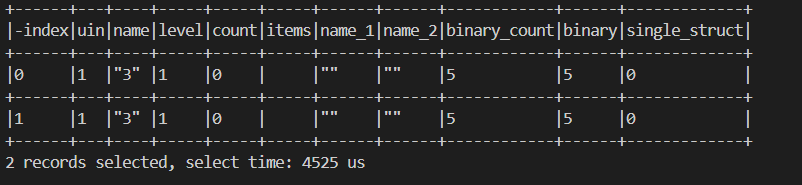
默认情况下,TcaplusDB Client会将二进进程数据以十六进制格式编码输出(如下图中的binary和single_struct字段),但也支持用户通过编写SO插件的方式,自定义二进制数据输出格式。
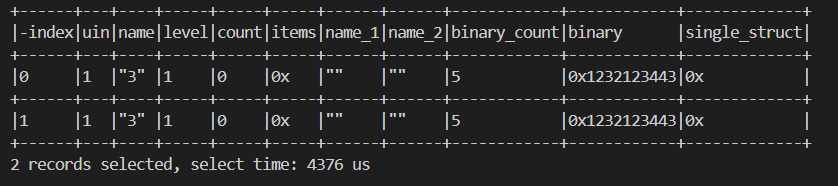
限制:目前仅支持对TDR表的一级binary类型字段和PB表的byte类型字段的二进行数据自定义输出格式。
用法:
- 编写SO插件,如下所示,接口命名为ParseRecord,参数包括app_id、zone_id、table以及key和value,其中key map保存主键的字段名和值,value map保存非主键的字段名和值,解析之后的值也存在这两个map里面,log用于异常情况的报错提示。接口返回int类型,非0情况视为异常发生。
本例将single_struct字段和binary字段原本的十六进制格式输出,改为只输出字段内容的长度。
parse.cc
#include <string>
#include <map>
#include <sstream>

typedef unsigned long long uint64_t;
typedef unsigned long int32_t;

template<typename T>
std::string ToStr(const T& val)
{
        std::ostringstream oss;
        oss<<val;
        return oss.str();
}
// g++ -fPIC -shared -g -lstdc++ parse.cc -o parse.so
extern "C" int ParseRecord (const int32_t app_id, const int32_t zone_id, const char* table, std::map<std::string, std::string>& key, std::map<std::string, std::string>& value, std::string& log)
{
        std::map<std::string, std::string>::const_iterator iter = value.find("single_struct");
        if(iter==value.end())
        {
                log = "invalid value, not find single_struct.";
                return -1;
        }
        std::string val = value["single_struct"];
        value["single_struct"] = ToStr(val.size());
        iter = value.find("binary");
        if(iter==value.end())
        {
                log = "invalid value, not find binary.";
                return -1;
        }
        val = value["binary"];
        value["binary"] = ToStr(val.size());

        return 0;
}
- 编译SO文件。
g++ -fPIC -shared -g -lstdc++ parse.cc -o parse.so
- 启动TcaplusDB Client时,通过-L参数指定SO文件路径。
./tcaplus_client -a 2 -z 3 -s "35D60968120FA165" -d 9.135.12.47:9999 -L ./parse.so
- 查询数据,查看输出
select * from table_list_bin where uin=1 and name=3;